Web Technologies I – Midterm Exam
Write your answers on the answer sheets provided. You may refer to
printouts of one page you have written. You may also make use of the HTML and
CSS quick reference guides distributed in class. You may also bring a printout
of the Javascript command sheet (without commentary).
- (2 pts each) Expand each of the following acronyms:
- HTML
- CSS
- Answer these questions of about the client-server architecture of
the web and how it applies to web development.
- (2 pts) Name one popular web client.
- (2 pts) Name one popular web server.
- (2 pts) Name one major limitation of client-side code.
- (3 pts each) Construct regular expressions that will match each of
the following strings:
- a string that contains a four digit year in the range 2000-2099
- a string composed of only an IPv6 address which is written as eight groups of 4 hexadecimal digits. An example might be: fe80:1a60:24ff:fea6:f93b:24ff:fea6:f93b. Each hex digit is a digit in the range 0–9 or a–f. You can assume letters will be lowercase.
- (3 pts) What is the Document Object Model (DOM)?
- (4 pts) We have been putting this CSS code in all of our projects:
html {
   box-sizing:border-box;
}
*,*:before,*:after {
   box-sizing:inherit;
}
Explain how this affects how some HTML elements are displayed. Be specific. - Consider this section of HTML code:
<body style="width:960px">
	<div style="border:1px solid">
		<h2>Hello</h2>
	</div>
	<div style="border:1px solid">
		<h2>Goodbye</h2>
	</div>
</body>
- (3 pts) Sketch how you would expect this page to be rendered when viewed in a full-page browser.
- (3 pts) Suppose we modify the open body tag to read:
<body style="width:960px; display:flex">Sketch the page with this change applied.
- Assume you are given the following code as a starting point:
exam_solutions/2023.midterm_start.html
Unless specifically asked to do so, do not modify the provided HTML. Assume
any CSS commands you are asked to produce appear in the
<style>section in the<head>and that Javascript commands will appear in the<script>section near the bottom. By following the steps below you will create a page that looks like figure 1.- (2 pts) Circle the HTML tag in the provided code that will cause the page
to render properly when viewed on a handheld device.
- (2 pts) Write CSS commands to give all
<section>blocks a background color of#aabbccand a foreground color of#222222. - (2 pts) Write CSS commands to give the body a maximum width of 960 pixels
and to center itself on the page.
- (8 pts) Write CSS commands that will use flexbox to render the header
and footer at full width. The three sections should be rendered side-by-side
with a reasonable amount of spacing around them as shown in figure 1.
- (3 pts) Write CSS commands to responsively enact the following changes when
the screen width reports to be less than 700 pixels.
- (2 pts) The three sections should take on full width and be displayed vertically.
- (1 pts) The three sections should have 10 pixels between them.
- (3 pts) Write HTML code that will use a
<table>to produce the tabular data in the scores section. - (7 pts) Write HTML code that will produce a form with the same elements
as depicted the middle section of the goal document. The form should
include an error message related to the text box that is initially
hidden, but says: “Only letters and spaces!”
- (3 pts) Write HTML code to produce the numbered list in the third section.
- (3 pts) Write an event handler that will execute code when the form is submitted.
This function should do the following actions:
- (2 pts) Cause the checkbox to be checked regardless of what it was set to by the user.
- (6 pts) Verify the text box contains only letters and spaces. If any other characters are found then reveal the error message that was created and hidden in problem 7g.
- (4 pts) Assuming the text box contains the required values, copy the data from the text box into the h2 whose id is “your-thoughts".
- (2 pts) The form should not post if an error is detected (and should post if no errors are detected).
- (2 pts) Circle the HTML tag in the provided code that will cause the page
to render properly when viewed on a handheld device.
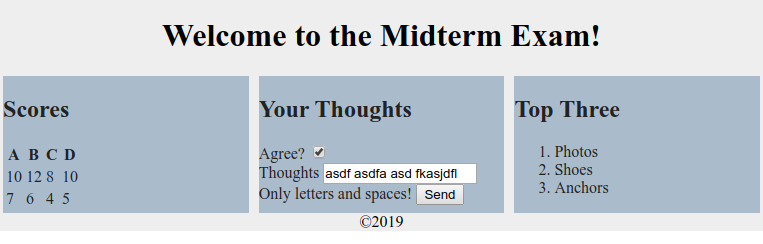 Figure 1: The Goal!