This assignment provides practice implementing a responsive design using flexbox.
Also, it will involve highly customizing an unordered list to produce an attractive
menu.
In all you do please remember that being a part of CSCI@HSU means DOING THE RIGHT THING.
- Doing the right thing matters.
- Doing the right thing means developing competence.
- Doing the right thing means living in community.
- Doing the right thing means finding moral, effective, and correct solutions.
- Doing the right thing means honoring God in all we do.
So, do this assignment in a way that demonstrates integrity, develops
competence, is correct, and honors God ... because what we do matters!
In completing this assignment you MAY use/access the following resources:
- The quick reference guides below (which include the printed guides
handed out in class):
- VSCode Editor in its configuration as provided in the course repo. You may use the
extensions that were suggested when you first launched VS Code in the repo directory.
- The instructor-provided notes for this course: https://docs.google.com/presentation/d/1NvzTydQUHc8_-bX2oH1hyzSbFMYByCsp/edit?usp=sharing&ouid=102845346193600525432&rtpof=true&sd=true
- Your own course notes
- Your instructor
- Discussions about the assignment with other students as long as you
never look at the working code of another student. Another student should
never tell you what to type and you should never tell another student what
to type.
- Websites that provide general instruction on HTML and CSS as long as they are
not targeted specifically to the assignment on which you are working. As an
example, if you want to learn about techniques for applying a color scheme
to a web site, this is a good thing to look up. If you are looking for a
solution to a specific Javascript programming exercise given in a homework
assignment, that is NOT something you should look up. REMEMBER: The goal is
for you to become proficient, so you need to figure some things out.
- Examples provided at: https://josephus.sergeantservices.com/classes/w1/source/
You may NOT use/access:
- Resources not expressly listed above, including, but not limited to,
the following ...
- Code-producing extensions to VSCode that are beyond the default
configuration (such as code completion, CoPilot, or other AI-enabled extensions).
- Code produced by code-generating tools of any kind (ChatGPT as one example).
- Code produced by other people (including classmates) that is targeted
to solve the specific assignment you are working on.
Failure to abide by these guidelines will result in a zero for the assignment
and the incident will be reported to the university provost as a violation of
the university academic integrity policy. A second incident of academic
dishonesty (whether from this course or another computer science course) will
result in an F in the course.
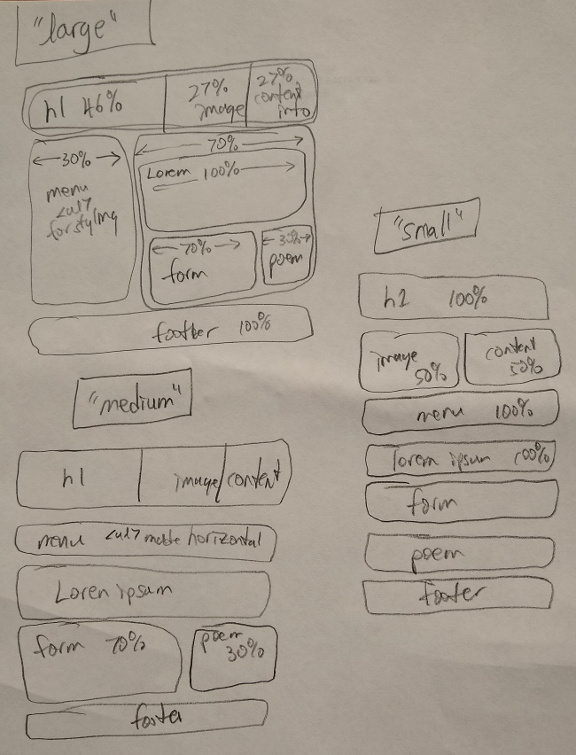
This assignment continues the work started on lab day. If you haven't done so
already you need to complete all lab day work. Use the diagram provided in
responsivelayout.jpg
to guide you as you use flexbox (no floats allowed) to implement a responsive
page with two breakpoints.
As with lab day instructions this diagram serves to provide the big-picture
structure of the assignment while the instructions below contain the specifics.
IMPORTANT: The instruction for this section are asking you to do a web search
to find examples of styling an unordered list to produce a menu. This is a specific
exception to the list of allowable resources. DO NOT use AI for this. Visit actual
sites and then borrow and integrate the code from the site you like.
IMPORTANT: Whatever design you choose will need to be integrated into your own
color scheme and will need to support both a horizontal and vertical orientation.
You may want to find a good horizontal solution and then just tweak it to make it
vertical.
One of the issues in our design is that in the large design the menu needs to
be vertically arranged and in the medium design it needs to be horizontally
arranged. It is common to use unordered lists (<ul>) for rendering
menus. There are many great tutorials where you can find examples of how
to create lists for this purpose. Do a web search to find several of these examples
and select one or two that you especially like. Use the CSS code provided in
the examples to provide a highly customized look to your menu that fits nicely
with your chosen color scheme. REMEMBER: You will need a vertical arrangement
for the large design and a horizontal arrangment for the medium and small
designs. When looking be sure to use CSS-only solutions (i.e., no Javascript).
(I'll be really sad if everyone uses the code from W3Schools ... there
are lots of wonderful examples!)
Modify the code on your personal web page to make use to flexbox to achieve
the layout. You should not use any float properties in your CSS. You are not
required to have a responsive design at this point.
Once you have the page looking the way you want. Your homework will be graded as follows:
IMPORTANT: All code should pass the syntax check with no warnings and no errors.
| Part 1 |
12 pts |
| Part 2 |
10 pts |
| Part 3 |
8 pts |
| Total |
30 pts |
As always, have fun!