This assignment continues the use of CSS selectors provided in an external
document. You will also validate your syntax before each commit.
In all you do please remember that being a part of CSCI@HSU means DOING THE RIGHT THING.
- Doing the right thing matters.
- Doing the right thing means developing competence.
- Doing the right thing means living in community.
- Doing the right thing means finding moral, effective, and correct solutions.
- Doing the right thing means honoring God in all we do.
So, do this assignment in a way that demonstrates integrity, develops
competence, is correct, and honors God ... because what we do matters!
In completing this assignment you MAY use/access the following resources:
- The quick reference guides below (which include the printed guides
handed out in class):
- VSCode Editor in its configuration as provided in the course repo. You may use the
extensions that were suggested when you first launched VS Code in the repo directory.
- The instructor-provided notes for this course: https://docs.google.com/presentation/d/1NvzTydQUHc8_-bX2oH1hyzSbFMYByCsp/edit?usp=sharing&ouid=102845346193600525432&rtpof=true&sd=true
- Your own course notes
- Your instructor
- Discussions about the assignment with other students as long as you
never look at the working code of another student. Another student should
never tell you what to type and you should never tell another student what
to type.
- Websites that provide general instruction on HTML and CSS as long as they are
not targeted specifically to the assignment on which you are working. As an
example, if you want to learn about techniques for applying a color scheme
to a web site, this is a good thing to look up. If you are looking for a
solution to a specific Javascript programming exercise given in a homework
assignment, that is NOT something you should look up. REMEMBER: The goal is
for you to become proficient, so you need to figure some things out.
- Examples provided at: https://josephus.sergeantservices.com/classes/w1/source/
You may NOT use/access:
- Resources not expressly listed above, including, but not limited to,
the following ...
- Code-producing extensions to VSCode that are beyond the default
configuration (such as code completion, CoPilot, or other AI-enabled extensions).
- Code produced by code-generating tools of any kind (ChatGPT as one example).
- Code produced by other people (including classmates) that is targeted
to solve the specific assignment you are working on.
Failure to abide by these guidelines will result in a zero for the assignment
and the incident will be reported to the university provost as a violation of
the university academic integrity policy. A second incident of academic
dishonesty (whether from this course or another computer science course) will
result in an F in the course.
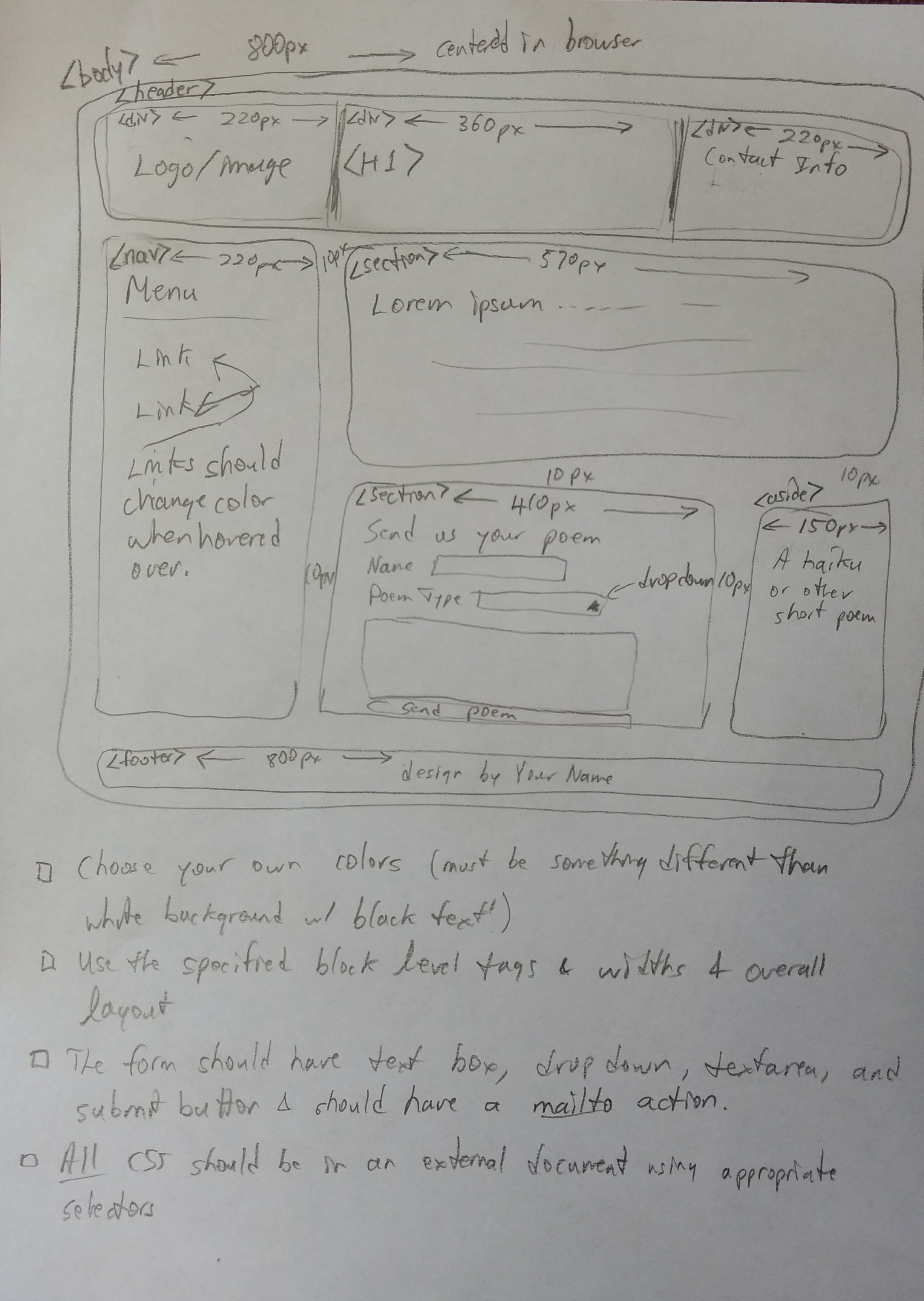
This assignment continues the work started on lab day. Continue to refer to
the diagram provided in
https://josephus.sergeantservices.com/classes/w1/source/images/poemlayout.jpg.
As with lab day instructions this diagram serves to provide the big-picture
structure of the assignment while the instructions below contain the specifics.
All CSS commands should be placed in the external document (i.e., do not
use any inline CSS). Make the following changes to your HTML document started
in lab day:
- (3 pts) Provide a logo or image in the left panel of the header. The
image should be sized appropriately.
- (1 pt) Give a title to the page in an h1 in the center header panel.
Title should be something about poems. Apply a CSS border of your
choosing to the h1 tag.
- (2 pts) Put some contact info as an unordered list (ul) in the right
header panel. Give your name a different color/look than the rest of
the entries.
- (2 pts) Modify your menu to remove the underlining of the links and
be sure to specify a hover option so the links should change color when
hovered over with a mouse.
- (2 pts) In the aside add haiku of your choosing. Be sure to include
title, author, and use proper formatting.
- (2 pts) Customize the content and look of the footer which will identify
you as the brilliant builder of the page.
- Set the max width of the page to 960px instead of 800px. Also set
the min width to 400px.
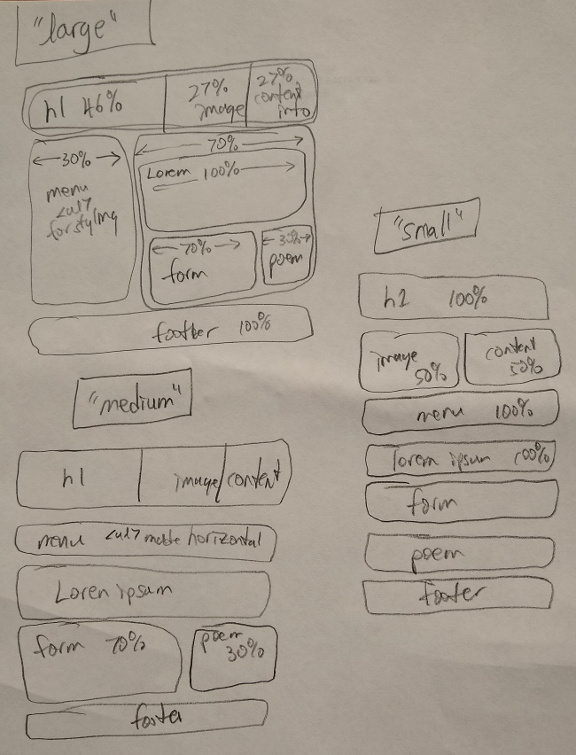
- (6 pts) Add media queries to provide at least two breakpoints in the
page so that the page looks nicely formatted for various screen sizes all
the way down to a typical phone screen. Feel free to consult
responsivelayout.jpg
for one idea of layouts for various screen sizes.
- (2 pts) Once you have the page looking the way you want. Take a moment
to check the validity of your code by utilizing the check script:
npm run check -- hw03
- As always commit and push your work when you finish a section of work.
We are going to start organizing your personal site a bit. Inside the hw03
directory create a folder called mysite. Within mysite create subfolders
called images and css. The HTML files for your project should be in
mysite. The images for your site should be in mysite/images and all
CSS documents needed by your site should be found in mysite/css. You should
only have your edited (small) images included. You should remove the original large
images from the repo. Go ahead and get all the files for your site set up
according to this plan.
Next, modify your site so that all CSS commands are issued in an external CSS
document found in the mysite/css directory. When you finish with this
transformation there should be no inline CSS commands and no style section
at the top of the HTML code and the site should look just as it used to.
NOTE: You do NOT need to create media queries to handle mobile layouts on your
personal site as part of this assignment.
Don't forget to run a syntax check on your work and to commit and push your work.
All work should be committed and pushed before the due date. Your homework will
be graded as follows:
| Part 1 |
20 pts |
| Part 2 |
10 pts |
| Total |
30 pts |
As always, have fun!